
How I organize photos in Lightroom (a simple system that scales)


Most Lightroom workflows collapse over time, whether people realize it or not. Not because Lightroom is bad, it isn’t, but because the system behind it slowly becomes chaos.
That usually isn’t a problem in the first few years. But once your archive grows into tens or hundreds of thousands of photos, you need a structure that actually holds up over time. Otherwise, files end up scattered across drives, folder structures keep changing, projects get renamed, and older work becomes harder and harder to retrieve. Eventually, your archive stops feeling like a library and starts feeling like a pile of disconnected shoots.
Photography is a process. Images you make today can gain new meaning years later. New patterns emerge. Connections between bodies of work become visible. Old photographs become useful again through a different perspective or project. But that only happens if your archive remains approachable, searchable, and organized in a way that survives change over time.
For me, Lightroom Classic became the best way to achieve that. Not because it’s perfect software, it isn’t, but because it allows me to treat my photography as a growing library instead of isolated projects.
The goal is not perfect organization. The goal is retrieval and trust. After years of experimenting with different workflows, this is the simplest system I’ve found that still scales across a lifetime of work.
TL;DR
- Use one Lightroom catalog for your entire archive
- Organize folders chronologically using
YEAR > MONTH - Let Lightroom handle meaning and retrieval through metadata
- Use Smart Collections to automate organization and surface mistakes
- Titles matter more than complex folder structures
- Keep RAW files intentionally instead of aggressively deleting them
- Build a system you can trust decades from now, not just today
I use one Lightroom catalog
A photography archive should behave like a library, not a stack of disconnected projects. That’s why I use a single Lightroom catalog for all my work.

I experimented with multiple catalogs for years, sometimes even creating a new one for every shoot or project. The supposed advantage was better Lightroom performance, but in practice the gains were negligible while the downsides became enormous over time.
Why I stopped using multiple catalogs
The biggest problem with multiple catalogs is fragmentation. Photography is rarely divided into clean, isolated projects. Bodies of work evolve gradually over time, often revealing connections years later. A single catalog allows me to cross-reference places, people, projects, cameras, and time periods across my entire archive at once. That becomes nearly impossible once your work is spread across disconnected catalogs.
A single catalog also forces consistency. There is one searchable library, one organizational system, and one place where all metadata, ratings, edits, and relationships live.
Lightroom performance has improved significantly over the years anyway, especially on modern hardware. Once I properly optimized my setup, performance stopped being a meaningful reason to split my archive apart.
Why I use Lightroom Classic instead of Lightroom CC
I specifically use Lightroom Classic instead of Lightroom CC because it offers the archival tooling I need long-term: Smart Collections, plugins, the Map module for attaching GPS-data, advanced export settings, and much more control over how files are managed. Lightroom CC is a cleaner and more modern app, but Lightroom Classic still functions far better as a serious long-term archive system.

My Lightroom folder structure is just Year > Month
It took me years to realize it, but once it clicked it felt obvious: the backbone of a photography archive should reflect things that cannot change. Every photo was taken on a specific day, in a specific month, in a specific year. That remains true forever. The projects, categories, and interpretations that flow out of that don’t.
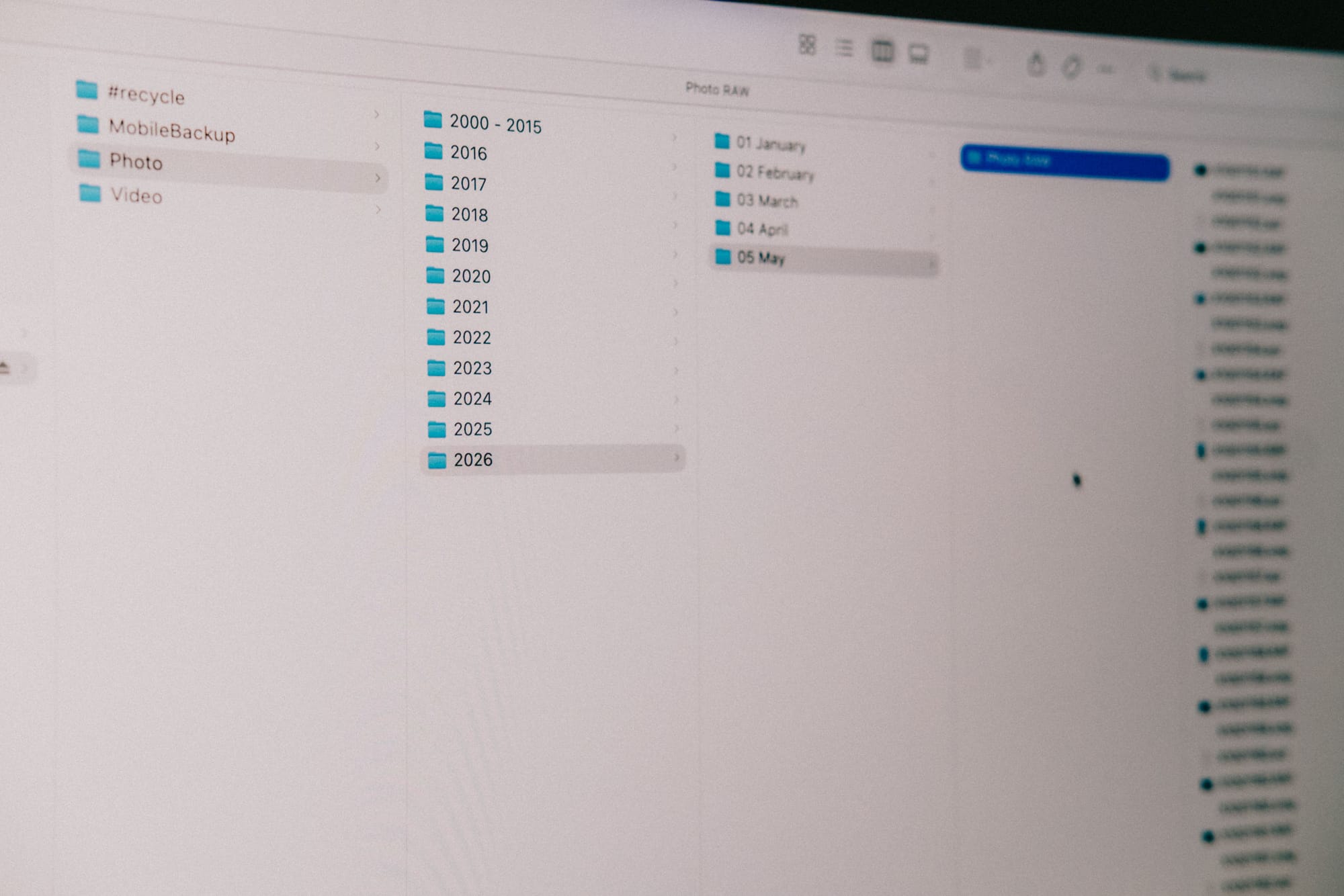
So my folder structure, both on my filesystem and inside Lightroom, is simply: YYYY > MM Month Name It's a system that works now and will continue to work decades from now.

Why I organize by date instead of projects
Photos are moments in time. So the backbone of a photography archive should reflect time itself. Dates are facts, projects are interpretations.
A photo taken in Bangkok in May 2024 will always have been taken in Bangkok in May 2024. But whether that image belongs to Travel, Street Photography, Personal Work, Summer in Asia, or some future project name is entirely subjective and likely to change over time.
That’s the problem with organizing archives around ideas instead of reality. Ideas evolve. Your relationship to the work evolves. A folder called Fun trip with the boys might make perfect sense today, but what does that mean five years from now? And how do you distinguish it from the next fun trip?
Dates don’t suffer from that problem. Every image was taken on a specific day, in a specific month, in a specific year. That remains true forever. That’s why I use time as the backbone of my archive and let Lightroom handle the interpretation layer through metadata, Smart Collections, titles, keywords, and ratings.
| Structure | Why |
|---|---|
| Year | permanent |
| Month | scalable |
| Projects | handled via metadata |
My Lightroom folder naming system
The beauty of this system is that it scales indefinitely without becoming more complicated over time. Whether I shoot 500 photos a month or 50,000 images a year, the structure itself never changes. There is no point where I have to rethink the entire archive because the foundation already reflects something permanent: time.
To keep everything sorted alphabetically (the correct sorting), I prefix each month with a number:
01 January02 February03 March
That way both Finder and Lightroom always display the archive chronologically without relying on additional sorting settings.
The exact same folder structure exists everywhere. My NAS mirrors Lightroom exactly, and Lightroom mirrors the filesystem exactly. Finder stores the RAW files permanently, while Lightroom acts as the searchable layer on top of it.
Finder stores the RAW files permanently, while Lightroom acts as the searchable layer on top of it.

I organize meaning inside Lightroom, not Finder
Finder stores my files. Lightroom creates the relationships between those files. Both are equally important, but they serve very different purposes. The filesystem handles permanent storage and structure, while Lightroom handles retrieval, metadata, ratings, Smart Collections, searches, and the relationships between images across time.
I import my files manually through Finder instead of using Lightroom’s built-in import copy workflow. I simply copy the RAW files from the SD card into the correct Year > Month folder on my NAS. Lightroom then indexes those folders and turns them into a searchable archive.
That separation is important. Even without Lightroom, the files still exist in a clean and readable chronological structure. Lightroom simply becomes the layer that makes the archive searchable, connected, and usable at scale. Together they create a system that is easy to maintain, difficult to break, and practically impossible to outgrow over a lifetime of work.
My metadata hierarchy
Not all metadata is equally important. A good metadata system should help future retrieval without creating organizational overhead.
This is the hierarchy I currently use inside Lightroom:
- Titles
- Stars
- Keywords
- GPS metadata
- Flags/colors

Titles are the most important metadata
Titles are by far the most important metadata in my system because they eventually become part of the exported filenames themselves. The system should not only help me understand the images years later, but also help future viewers understand what an image is about outside Lightroom too.
That’s why my titles stay short, concrete, searchable, and future-proof like Thailand-Bangkok or Netherlands-Amersfoort, instead of Fun trip with the boys or Covering-Amersfoort-Netherlands-Winter.
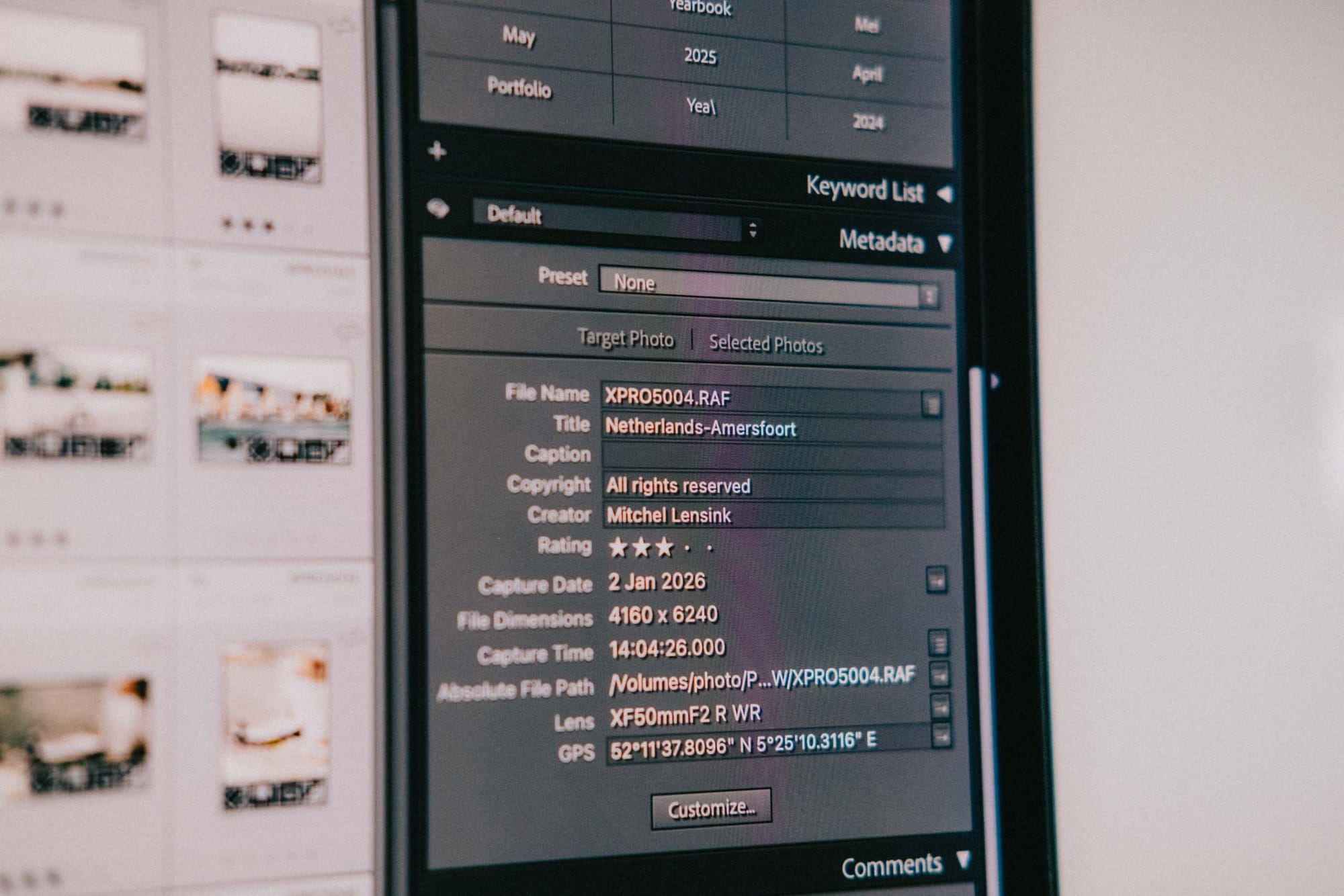
The goal is to use the highest-level concrete truth available. Objective naming of places and people outlast my subjective interpretations. Subjective naming systems usually collapse over time because your relationship to the work changes constantly and what might be true today is perhaps not true in a couple of years.
Stars, keywords, and GPS metadata
Stars are the second-most important layer because they denote keeper hierarchy. A flag can only really be on or off, while stars allow much more nuance over time. In my case:
0 stars= rejected or irrelevant3 stars= keeper4–5 stars= increasingly important work
Keywords are secondary support data. I mainly use them to build logic on top of through Smart Collections and automated organization. They help refine searches when titles alone are not enough.
GPS metadata is incredibly valuable to me because it adds another searchable layer to the archive entirely. I record GPX tracks separately and connect them to my images later inside Lightroom. Seeing photographs laid out geographically on a map often reveals relationships and patterns I would have otherwise missed.
Flags and color labels exist mostly as temporary workflow tools on top of everything else, not as permanent organizational structure.
Should you organize photos with folders or metadata?
Both, but they should solve different problems. Folders should handle permanent structure and storage. A simple chronological structure like Year > Month is stable, future-proof, and easy to maintain over time.
Metadata should handle interpretation and retrieval. Titles, keywords, ratings, GPS data, and Smart Collections create relationships between images without constantly changing the underlying folder structure.
Most photography archives become chaotic because too much meaning gets forced into folders themselves. Deeply nested project structures, subjective folder names, and constantly evolving categories eventually stop making sense over time.
The most scalable approach is:
- use folders for immutable structure
- use metadata for meaning and retrieval
That separation keeps the archive readable outside Lightroom and searchable inside it.
Smart Collections are the real superpower
The real power of Lightroom is not the editing tools, you can get those in many other places. It’s the organizational tools. Specifically the automation. Manual organizational systems eventually fail because humans are inconsistent over time. You forget things, you change your mind, you import differently one month compared to another. As a result, mistakes slowly accumulate and eventually become difficult to trace back. Lightroom's Smart Collections solve that problem.
Why automation matters
Automation puts a fail-safe in place for human error. Categorization happens automatically because the logic only has to be set up once. If something breaks or metadata is missing, it becomes immediately visible. A good organizational system should surface mistakes automatically.
That’s why Smart Collections matter so much. They scale better than manual organization because they remove the requirement to remember every single organizational decision over long periods of time. Instead of manually building structure over and over again, the system simply reacts to the metadata already attached to the files.
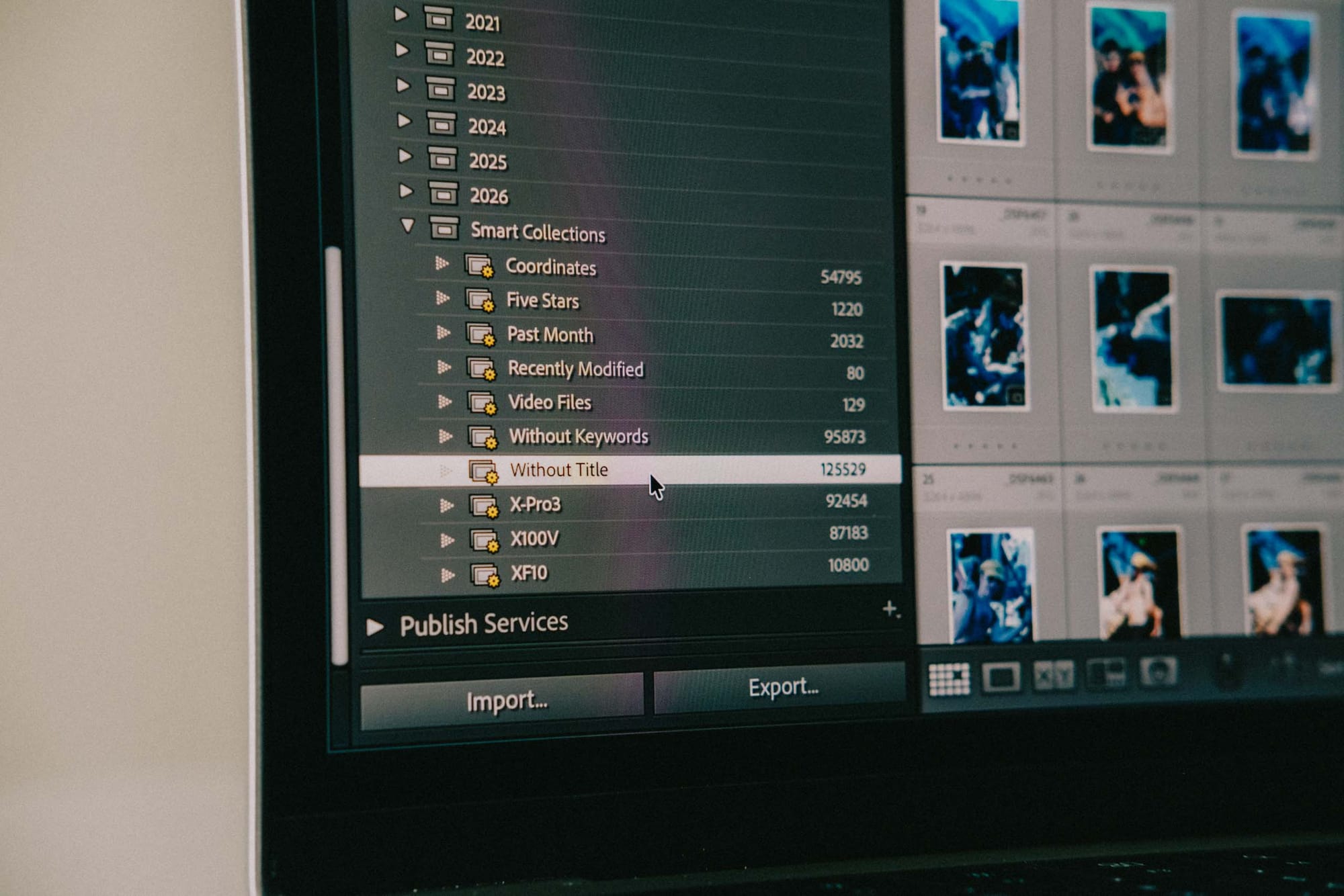
Smart collections reduce human error
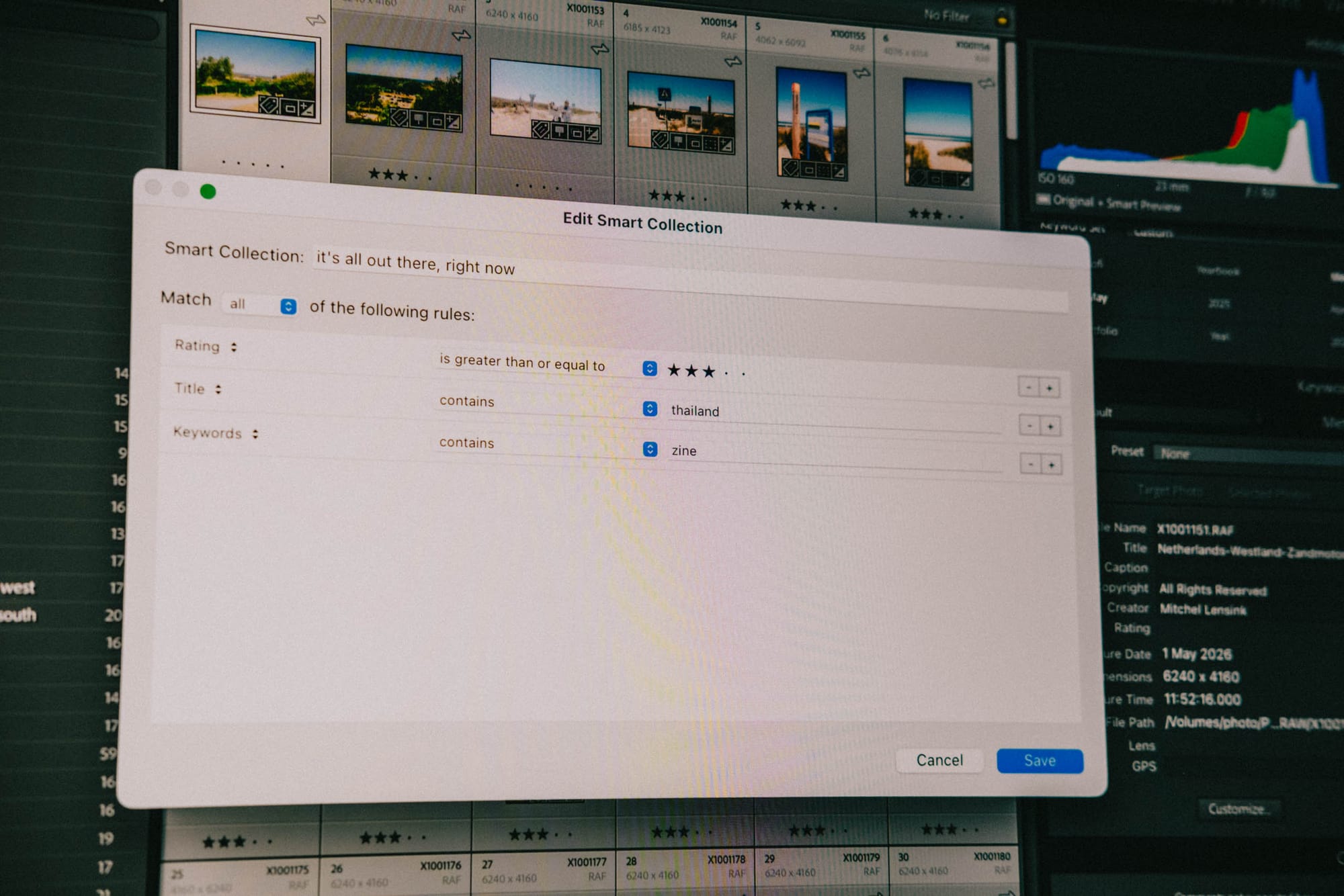
I use Smart Collections to automatically sort images based on titles, ratings, keywords, cameras, and dates. They mirror my Year > Month structure while also creating additional ways to browse the archive dynamically.
Some collections exist specifically to surface mistakes like Without Title and Without Keywords. And others simply help me make sense and browse the archive:
- year and month collections
- project-specific collections
- portfolio and yearbook collections
- camera-based collections
The important thing is that the archive becomes self-correcting. If something is missing or categorized incorrectly, it becomes visible almost immediately instead of disappearing silently into the filesystem somewhere.
The important thing is that the archive becomes self-correcting.
I don’t delete photos anymore
I know the opinions on this are divided but I rarely delete photos anymore. Only images that are obviously broken, accidental, or completely unusable get removed from the archive. The main reason is simple: your perspective changes over time.
I have many images that I originally considered failed photographs but later found interesting again, sometimes years later. An image that does not work for one edit or project might suddenly become useful through a different crop, a different sequence, or a completely different understanding of the work itself.
Don’t trust your current self to make permanent decisions for your future self. Your current emotional state, technical understanding, and relationship to the work will always influence how you judge images in the moment. Keeping the files gives you the space to return to them later with different eyes.
That only works if you shoot responsibly, of course. I stopped excessive burst shooting years ago because I want the archive to remain intentional and manageable over time. But that does not mean the goal is not to keep everything out of fear. The goal is to preserve the possibility for the work to gain new meaning later.
Should photographers delete RAW files?
Only if the files are clearly broken, accidental, or completely unusable.
Many photographers aggressively delete RAW files during early culling, but that approach assumes your current judgment will remain correct forever. In reality, your relationship to your work changes over time. Images that initially feel unimportant can later become useful through a different crop, project, sequence, or perspective.
Keeping RAW files also preserves flexibility. The original file always contains more information than an exported JPEG and allows future edits, reinterpretations, and higher-quality exports later on.
That does not mean shooting carelessly or keeping thousands of meaningless burst images. A sustainable archive starts with intentional shooting in the field and a clear organizational system afterward.
Backup, trust, and long-term scalability
A photography archive only becomes useful long-term if you trust it completely. My RAW files live on a Synology NAS with roughly 40TB of available storage. That NAS then backs up to Backblaze B2 on a rolling 90-day window and to AWS S3 Glacier Deep Archive for cheap long-term cloud storage. I also keep my Lightroom catalog locally on my MacBook inside the Pictures folder because Lightroom constantly writes supporting files while working. Keeping the working catalog local simply makes the system more reliable.
Every time I close Lightroom, the catalog backups get written to iCloud Drive as well. Alongside the RAW files themselves I also store the Lightroom .xmp and .acr sidecar files so the most important edits and metadata remain readable outside Lightroom too.
My backup philosophy
The goal of the system is not perfection, but trust. I want to know that I can retrieve work from years ago quickly and confidently without having to wonder where a hard drive is, whether a folder structure still makes sense, or if files are still readable somewhere.
That trust removes almost all anxiety from the archive entirely. Requests for old work stop feeling stressful because the system remains searchable, understandable, and approachable over time.

Why trust matters more than perfection
The system eventually disappears because you trust it completely. There is no point where I expect to completely reorganize the archive again in the future. The structure already reflects something permanent, and Lightroom continues building relationships on top of that foundation as the archive grows.
There is no point where I expect to completely reorganize the archive again in the future.
The only real limit is storage space, and storage is ultimately a solvable problem. The system itself scales indefinitely. An archive is not just storage, I think that's far too limited of an approach. Instead, an archive is the ability to revisit your work with new eyes, whenever you feel like it, without friction.
FAQs
Below are the questions I see photographers struggle with most when building a long-term Lightroom workflow. Most of them become much easier to answer once you stop treating Lightroom as an editing app and start treating it as a searchable archive system.
Should I use multiple Lightroom catalogs?
No. A single Lightroom catalog scales much better long-term because it keeps the archive searchable, connected, and consistent.
Multiple catalogs fragment the work into isolated projects, making it harder to discover relationships between images across years, places, people, and bodies of work. Modern hardware and proper Lightroom optimization also make the old performance arguments for multiple catalogs far less relevant today.
What is the best Lightroom folder structure?
The most scalable Lightroom folder structure is a simple chronological system like:YYYY > MM Month Name
Dates are stable and future-proof. Projects, categories, and interpretations change constantly over time. Organizing by date creates a permanent backbone while metadata inside Lightroom handles meaning and retrieval.
How do professional photographers organize photos?
Most professional photographers use some combination of:
- chronological folder structures
- metadata
- ratings
- keywords
- collections
- backups
The important part is consistency. A good photography archive should remain searchable, understandable, and maintainable over decades of work, not just during the current project.
Should I organize photos by project or date?
Date is the more stable foundation. Projects are interpretations that evolve over time, while every image was still taken on a specific day, month, and year. Using time as the backbone of the archive prevents the folder structure from constantly changing as the work evolves.
Do photographers delete RAW files?
Some do, but aggressively deleting RAW files assumes your current judgment will remain correct forever.
Many photographers later rediscover images they originally considered failures. Keeping RAW files preserves flexibility for future edits, projects, crops, reinterpretations, and changing perspectives.
Is Lightroom Classic still worth using?
Yes. Lightroom Classic remains one of the strongest long-term archive systems available for photographers.
Features like Smart Collections, advanced metadata handling, plugins, the Map module, export control, and local file management still make it significantly more powerful for large archives than Lightroom CC.
How many photos can Lightroom Classic handle?
Lightroom Classic can handle extremely large archives if the system behind it is organized properly.
A single catalog with hundreds of thousands of images is completely workable on modern hardware, especially when using Smart Collections, optimized settings, and a consistent folder structure.
Should Lightroom catalogs live on external drives?
Usually not. Keeping the active Lightroom catalog locally on an internal SSD is generally more reliable and significantly faster because Lightroom constantly reads and writes supporting files while working. The RAW files themselves can still live on external drives or a NAS.
Just you, me, and some occasional notes from the field. No spam.
Member discussion